Free to use · v3.0 · Windows, macOS, Linux, Docker, Kubernetes
Ship AI apps,
not infrastructure.
AI App Server runs chat over your documents, extraction, agents and approval workflows from one small config file. The web service, vector search, memory, job queue, model gateway, guardrails and audit log are already inside. One download, about 20 MB.
The problem: an AI demo takes a day, the production app takes months
The model call is the easy part. Before an AI app can serve real users, someone has to build and run everything around it:
- A vector database, plus the chunking, embedding and re-indexing pipeline that feeds it
- Conversation memory and a cache, usually Redis
- A job queue for long documents and agent runs, often with Kafka
- A model gateway for retries, fallbacks, budgets and cost tracking across providers
- Guardrails for personal data, prompt injection and unsupported answers
- Sign-in, roles, audit and secrets before security will approve it
- Deploys, rollback, monitoring and backups for every app
- Glue code to hold it all together, rewritten for every new app
That is eight systems to choose, secure, pay for and keep running, before the first user asks a question.
The answer: one server that already has all of it
| You need | The usual way | With AI App Server |
|---|---|---|
| Search over documents | Vector DB + ingestion pipeline | Built in: hybrid vector and keyword search over PDF, Office and web documents, plus connectors |
| Memory and cache | Redis | Built in, and Redis clients still work |
| Jobs and events | Celery, Kafka | Built in, with retries, dead letters and Kafka bridges |
| Many model providers | An AI gateway | Built in: OpenAI, Azure, Anthropic, Gemini, Bedrock, local models |
| Safety | Custom filters | Built in: PII redaction, injection checks, citation checks |
| Security sign-off | Weeks of work | Built in: Entra ID / OIDC, roles, encrypted storage, audit export |
| Shipping changes | CI scripts per app | aiapp deploy, with versions and one-command rollback |
You write only what makes your app different: a few settings, and Python or JavaScript handlers when you need them.
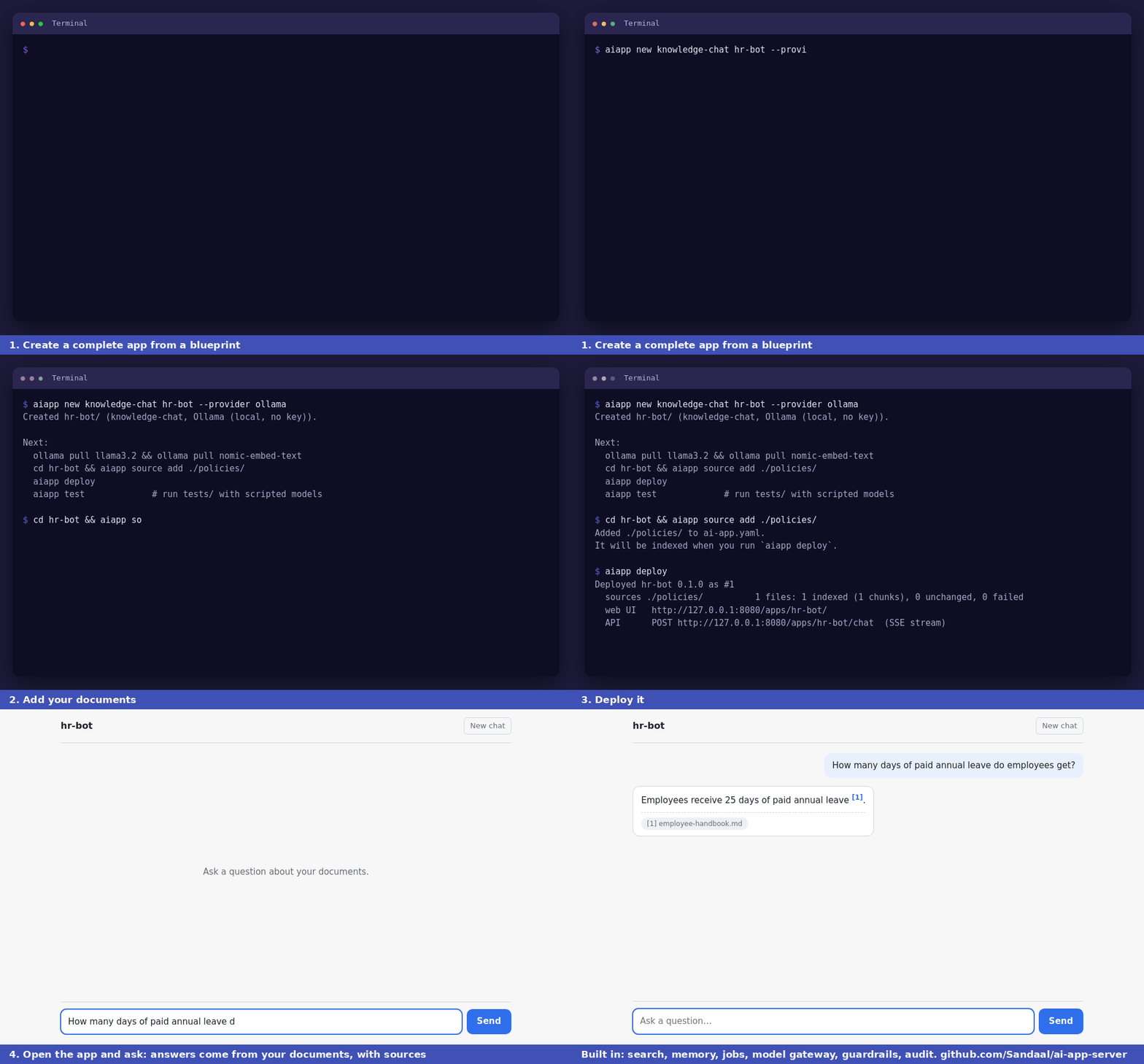
From folder to live app in three steps
-
1 Pick a blueprint
aiapp new knowledge-chat hr-botcreates a complete, working app: settings, page and tests. -
2 Add your documents and model
Point it at a folder, SharePoint, Git or a website. Choose any model provider, or a local model.
-
3 Deploy
aiapp deploy. Your app is live with a web page, an API and its own quotas, and can be published to AI agents over MCP.
Ten ready-made apps for the most common AI use cases
Start from a blueprint that already works, and change only what you need.
-
Knowledge chat
Answers from your documents, with citations
-
Customer support
Calls your tools, asks a person before refunds
-
Document extraction
Invoices and forms to JSON, with page evidence
-
Summarization
Long documents to key points
-
Classification
Route tickets and emails to your labels
-
Meeting notes
Recordings to decisions and owners
-
Content review
Drafts with human review and revisions
-
Data insights
Questions over SQL and CSV, queries shown
-
Code assistant
Answers about a codebase, citing files and lines
-
Workflow agent
Tools and MCP servers, with approvals
Built for production from day one
-
Secure by default
Everything on disk is encrypted. API keys with roles, Entra ID and any OIDC sign-in, per-tenant isolation, and an audit log you can stream to your SIEM.
-
Safe answers
Redact personal data before it reaches a model, block prompt injection and banned topics, and withhold answers the documents don't support.
-
Costs under control
Token and cost budgets per app and per key. Route each request to the cheapest model that meets its latency target, and fall back across providers.
-
Observable
Traces of every request, model call and tool, plus Prometheus and OpenTelemetry metrics and a web console.
-
Safe to change
Every deploy is a version. Zero-downtime deploys, instant rollback, evaluations before you ship, and encrypted backups.
-
Isolated apps
One misbehaving app can't exhaust another's memory, disk, model budget or workers. It runs in separate worker processes under its own quotas.
Runs where your data is
-
Your laptop
Windows, macOS and Linux. Starts in seconds. VS Code extension included.
-
Your servers
Docker, Kubernetes (Helm), Azure (
azd up), or a plain Linux service. Fully offline installs for air-gapped networks. -
Your models
Hosted providers, or local models through llama.cpp and Ollama, so data never leaves the building. vLLM on GPUs is in preview.
-
Your scale
Grow from one server to a cluster where every node serves and data is replicated across nodes.
Numbers, not adjectives
10blueprints, each tested end to end with a real local model
~40 MBmemory for an idle server
94 req/sstreamed chat answers on 8 CPUs, with zero errors
0acknowledged writes lost when a cluster's leader was killed mid-load
The load test uses a stand-in model with fixed latency, so it measures the server itself: see Performance and sizing. Project status lists what has been verified on which hardware.
Who it's for
-
App developers
Get from idea to a working AI app in an afternoon, without assembling a stack first. Python or JavaScript, and your own frameworks if you like.
-
Platform and IT teams
Offer AI apps to the whole organization on one governed platform, with sign-in, audit, quotas and budgets, on your own servers.
-
Regulated and offline environments
Keep data on-premises with local models and encrypted storage. Confidential computing support is in preview.
Free, open about its testing, and growing
AI App Server is free to download and use. Its SDKs, example apps and deployment templates are open source under the Apache 2.0 license. The single-server platform is tested on real systems. The newest features, for GPUs, DPUs, CXL memory and confidential VMs, are in preview: they are built, but so far tested only on emulated hardware. We say exactly what has been tested on which hardware, and we're looking for partners with that hardware.
Project status and help wanted Offer hardware access